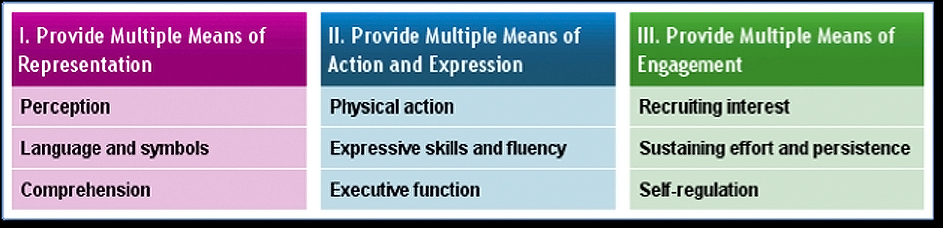
Universal Design for Learning aims to make modifications in three broad areas that together deliver a programme that will best meet the needs of all learners. In each area the barriers to success are identified and where possible removed or minimised. UDL identifies three essential Neural Networks that combine to produce effective learning, each network as a corresponding place in the learning process. Recognition Networks are the systems that allow us to gather information from our environment and we categorise and make sense of that. This is the ‘what’ of learning, the content and especially how it is presented. Strategic Networks encompass the planning and performing tasks we engage in when learning and the expression and organisation of ideas. This is the ‘how’ of learning and the ways we demonstrate and share our learning. Affective Networks control the learner’s engagement with the task and motivation towards it. This is the ‘why’ of learning. The consequence of these networks is that when we plan our learning experiences with this in mind we need to:
- Present information and content in different ways
- Differentiate the ways that students can express what they know
- Stimulate interest and motivation for learning
Universal Design for Learning is about identifying the needs of all learners and then planning to deliberately meet these needs. It is not about modifying the programme as it is taught and it is not just about students with special needs. A well-designed UDL programme will maximise the learning of all students. In many cases removing a barrier can be a simple process of offering options for how content will be delivered for example replacing or augmenting a written text with a video to suit students with dyslexia will allow all learners to gain the information they require, replacing a written essay with an interview will overcome barriers for students with writing difficulties on a task where an essay is not one of the outcomes. Information and Communication Technologies (ICT) can play a part in the process of facilitating access. Emerging tools such as Read & Write for Google can convert text to speech, speech to text and incorporates tools for definitions and highlighting. Such a tool would enable a student to access and respond in ways not that dissimilar to their peers.
Is UDL just making things easier, too easy?
No. UDL is about addressing the required outcomes in ways that are achievable given the particular learning strengths or weaknesses of a student. If the task is about understanding the impact of a historic event and extracting lessons that the modern world can learn from this, why must students use a specified text book as their source of information and why must they demonstrate their synthesis of ideas through a written response. By insisting on a mode of expression and source of information we are adding very specific details to the desired outcome, it is now ‘Use the ideas presented in TEXT A to explain in WRITING the impact of historic event B etc.’ If the outcome is to write an essay then this may not be avoidable but in this case the teacher will be scaffolding the writing of essays and not assuming these skills are present.
In some cases the barrier to learning may be that the intended task was too easy for the student. A talented mathematician may be restricted by a lesson that teaches a formula for solving a specified problem. This student might not be engaged in such a task or be prevented from developing a deeper understanding by watching a short film explaining the process. A more relevant approach for this student might be the presentation of a highly complex scenario in which the student is allowed to discover the formula. For this student the level of abstraction, lack of concrete modelling and reduced level of teacher direction provides the right environment. Only by identifying this need in the planning phase (long before the formula is exposed to the class) and offering multiple pathways can the needs of these learners and their peers be met.
How can I learn more?
CAST is the ideal starting point for an exploration of UDL and for resources to guide the development of programmes.